||
- Clunky and outdated user interface
- Limited support options
- More expensive than average tax software
- Plenty of intra-section summaries
- Robust calculators
- Helpful error messaging that contains corrective actions
- Request to sell information added in the “Basic information” section
- Too much text on every screen
- No option to import tax forms
FileYourTaxes.com is tax-filing software designed to make the process quick and easy. It has helpful calculators and built-in error detection. However, it’s expensive and difficult to navigate, putting it near the bottom of our recommendation list for your 2026 taxes.
Below, we detail the areas of disappointment and a few areas where FileYourTaxes.com offers its most useful features, in case you’re thinking about using it's platform to file your taxes.
If you’re shopping around and know FileYourTaxes isn’t ideal for your needs, here’s our list of the best tax software.
Table of Contents
FileYourTaxes.com - Is It Free?
What’s New In 2026?
Does FileYourTaxes.com Make Filing Easy In 2026?
FileYourTaxes.com Features
FileYourTaxes.com Drawbacks
FileYourTaxes.com Plans And Pricing
How Does FileYourTaxes.com Compare?
How Do I Contact FileYourTaxes.com Support?
Is It Safe And Secure?
Why Should You Trust Us?
Who Is This For And Is It Worth It?
FileYourTaxes.com FAQs
FileYourTaxes.com - Is It Free?
FileYourTaxes.com comes with a significant price tag. Most returns cost $55 for Federal filing and $50 per state. Business owners and others with more complex taxes will pay a base fee of $75.
While it says on the FileYourTaxes.com website that you can “e-file” for free, it’s definitely not a free tax filing service. The company charges for both state and federal filing. Pretty much every competitor offers electronic filing across all tiers.
Free versions are available through the IRS Free File program if you meet these requirements:
- Seniors age 66 or above earning between $8,500 and $79,000 per year
- Active duty military earning under $79,000 per year
If you're looking for a free alternative, check out our list of the best free tax software.
What’s New In 2026?
For Repeat Users:
Prices Have Increased, But Overall Quality Has Not
The first thing we noticed is the new pricing for 2026. Most filers will pay $10 to $20 more than in prior years, depending on their filing needs. Otherwise, the app is mostly the same as last year.
The software has been updated to reflect changes to the tax code for the 2025 tax year (filed in 2026) from the IRS. The new tax brackets and limits for credits and deductions due to recent inflation were most notable.
It’s nice to see modest improvements, but FileYourTaxes would need to make a big leap forward to justify the high cost.
Does FileYourTaxes.com Make Filing Easy In 2026?
FileYourTaxes has a robust backend that includes helpful calculators and robust error checking. It offers useful error messages to users when something seems off. Unfortunately, this functionality alone doesn’t make tax filing easy.
FileYourTaxes has jumbled, poorly designed screens that feel more like 1990s Windows apps than modern web applications. Users have to answer questions that the software should determine on its own. The company has too much text on every screen, leading to tax-filing fatigue.
Website errors, including inconsistent pricing across pages and spelling errors in the main navigation menu, give us little confidence that the final result will be accurate and easy to achieve.
FileYourTaxes.com Features
FileYourTaxes.com is quite different from most other tax programs we tested. Most of the differences are detractors, but the software has a few shining moments.
Excellent Error Messages
Whenever a user receives an error message, File Your Taxes explains why the error occurred and what corrective action the user should take. This can be helpful when users might have missed a simple check mark in a box or a dollar amount.
Helpful Intra-Section Summaries
Some competitors don’t provide in-section or end-of-section summaries to help users assess whether they’ve completed the section properly. FileYourTaxes.com offers many useful summaries that show users the effects of everything they’ve done.
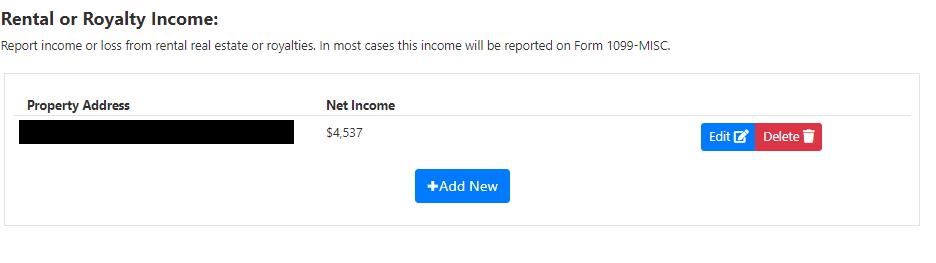
Useful summary for net income from a rental property.
FileYourTaxes.com Drawbacks
Most of the drawbacks of FileYourTaxes.com relate to the user experience. Filers may be able to use it effectively, but will have a terrible time while completing taxes.
Poorly Designed Interface
The FileYourTaxes user interface looks like a website from the early 2000s. The text and boxes are often crammed onto the screen with poor alignment. This may seem like a minor issue, but it can lead to many mistakes when users can’t see the information they're entering.
No Option To Import Information
Users can’t import tax forms like W-2 or 1099 forms. Given the price of FileYourTaxes.com, users should expect to snap pictures and have the software enter information on their behalf. However, FileYourTaxes doesn’t have this option, so users must manually transcribe information from their tax forms to the software.
Too Much Text
A primary issue with FileYourTaxes is the amount of text on each page. Filers need to read lengthy questions afterward and continue scrolling to complete each screen. The sheer volume of text on each screen causes filing to take much longer than necessary. Plus, it could lead you to accidentally glaze over a critical detail buried in the fine print.
FileYourTaxes.com Plans And Pricing
FileYourTaxes.com breaks pricing into two major buckets. The basic tier covers most people except those who are self-employed. The Complex tier covers self-employed people and business owners.
| | |
|---|
| Anyone who isn't self-employed | |
| | |
| | |
| | |
| | |
FileYourTaxes.com doesn’t offer many extras. You can use the site to file extensions or amended returns, but other major software services offer similar options (and are easier to use).
How Does FileYourTaxes.com Compare?
FileYourTaxes.com is priced at the high end of the market, but bargain competitors like Cash App Taxes and TaxHawk offer a better user experience.
We also compared FileYourTaxes.com to H&R Block, which is premium software that makes filing easy for almost all users.
Header | | | | |
|---|
| | | | |
Unemployment Income (1099-G) | | | | |
| | | | |
| | | | |
| | | | |
| | | | |
| | | | |
| | | | |
| | | | |
| | | | |
| | | | |
Retirement Income (SS, Pension, etc.) | | | | |
| | | | |
| | | | |
| | | | |
| | | | |
| | | | |
| | | | |
Small Business Owner (Over $5k In Expenses) | | | | |
| | | | Worry Free Audit Support Add-On ($19.99) |
| | | | Online Assist Add-On (starts at $39.99) |
| | | Free $0 Fed &
$15.99/State | |
| Complex $75 Fed &
$50/State | | Deluxe $7.99 Fed &
$15.99/State | Deluxe $35 Fed &
$37/State |
| | | Pro Support $44.99 Fed &
$15.99/State | Premium $55 Fed &
$37/State |
| | | | Self-Employed $85 Fed &
$37/State |
Cell | | | | |
How Do I Contact FileYourTaxes.com Support?
WARNING: Contacting Customer Service By Phone Costs $17.50 extra!
Customer support is not one of FileYourTaxes.com's strengths. Unlike its competitors, there are no options to receive advice from tax pros or even audit assistance.
Basic customer service is available by phone at 805-256-1788 and via secure messaging.
Operating hours for the phone support team are Monday to Friday, 9 a.m. to 4:30 p.m. (PT). Support by phone requires an additional fee of $17.50.
If you email them at [email protected], the typical response time is 24 to 48 hours.
If you'd prefer to try to find questions on your own, you can check out the free self-help section of the website.
Is It Safe And Secure?
FileYourTaxes uses multi-factor authentication and boasts multiple independent security credentials. It uses encryption to protect user information.
However, FileYourTaxes does appear to share your information with others. After completing a basic information section (including a required user agreement), FileYourTaxes asks for consent to sell your information to two specific lenders - and one of them doesn't even have to do with tax filing, but rather mortgage loans.
Of course, users can decline, but the decline button is a small check box, whereas the consent button is large and blue. We don't like this somewhat misleading practice.
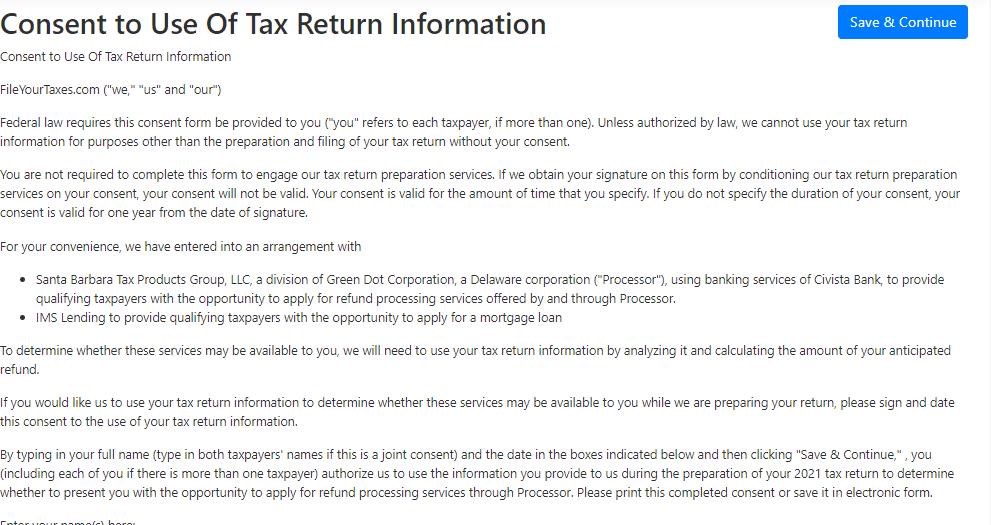
Slipping in a long boring form that agrees to give your information to lenders
Why Should You Trust Us?
The College Investor team spent years reviewing the top tax filing options, and we have personal experience with most tax software tools. I personally have been the lead tax software reviewer since 2022, and have compared most of the major companies on the marketplace.
Our editor-in-chief, Robert Farrington, has been testing tax software tools since 2011 and has tried almost every tax filing product. Furthermore, our team has created reviews and video walk-throughs of all of the major tax preparation companies, available on the College Investor YouTube channel.
We’re tax DIYers and want a good deal, just like you. We work hard to offer informed and honest opinions on every product we test.
How Was This Product Tested?
In our original tests, we used FileYourTaxes.com to complete a real-life tax return that included W-2 income, self-employment income, rental property income, and investment income. We tried to enter all the data and use every available feature. We then compared the result to all the other products we've tested, as well as a tax return prepared by a tax professional.
This year, we went back through and re-checked all the features we initially tested, as well as any new features. We also validated the pricing options.
Who Is This For And Is It Worth It?
FileYourTaxes.com offers calculators and useful summaries in 2026. Still, the software's strengths aren’t enough for us to recommend it.
It's far too expensive for what you get, and users paying a premium price for software can find better alternatives. Rather than using FileYourTaxes.com, filers should check out the best tax software for their situation.
FileYourTaxes.com FAQs
Let's answer a few of the most common questions that people ask about tax software sites like FileYourTaxes.com:
Can FileYourTaxes help me file my crypto investments?
FileYourTaxes supports crypto trading, but filers have to manually enter each transaction on the Capital Gains and Losses Listing Page. The page is long and complex and filers can only enter one transaction per page. Rather than enduring the cumbersome task of manually entering information, crypto traders may want to use software like TurboTax Premier and upload IRS form 8949 from TaxBit.com.
Can FileYourTaxes.com help me with state filing in multiple states?
Yes, FileYourTaxes supports multi-state filing. Users must select all the states requiring returns, and FileYourTaxes charges $40 per state return.
Does FileYourTaxes offer refund advance loans?
No, FileYourTaxes.com doesn’t directly offer refund advance loans.
Editor: Colin Graves Reviewed by: Robert Farrington
The post FileYourTaxes.com Review 2026 appeared first on The College Investor.
||
---------------------------
By: Eric Rosenberg
Title: FileYourTaxes.com Review 2026
Sourced From: thecollegeinvestor.com/23655/fileyourtaxes-review/
Published Date: Sat, 27 Dec 2025 08:15:00 +0000
Read More
.png) InvestingStocksToolsClubsVideosPrivacy PolicyTerms And Conditions
InvestingStocksToolsClubsVideosPrivacy PolicyTerms And Conditions